


Seeing
4.42.51K Reviews
App Specs
- Version
- 2.0.8
- Updated On
- License
- Free
- Downloads
- 500,000+
- Developer
- Lonsen Electronics Limited
- Categories
- Tools
- Platform
- Android
Screenshots
 Analysis by AppCompare
I’d choose Seeing for a very specific reason: it is meant to connect a visitor at your door with you through your smartphone, so the key question is whether you want that kind of remote interaction. It is a tools app from Lonsen Electronics Limited, and its appeal is practical rather than purely entertaining. If you are often away from home, or simply want to handle a visitor without immediately walking to the entrance, that purpose may be useful. If you are looking for a general camera-effects app, this is not the right fit.
Start with the way you want to answer the door
Before installing it, I’d think about the moments when you need it. Do you want to check who has arrived while you are in another room, or respond when you are away from home? Seeing is aimed at talking with and viewing visitors from a phone. That makes it different from a standard messaging app, which cannot show you who is at the entrance, and from a conventional doorbell that may require you to be physically nearby to answer.
The useful distinction is not simply “smart” versus “ordinary.” It is whether smartphone-based visitor communication fits your home and routine. A person who lives in a house with a clear entrance and regularly receives deliveries may value being able to respond remotely. Someone in a shared building where the entrance system is managed by a landlord, or someone who rarely receives visitors, may get much less from it.
Where a visitor app can make daily life easier
The strongest use case is a small interruption you would rather handle on your own terms. Imagine you are on a work call, cooking, or settling a child for a nap when somebody arrives. Instead of stopping everything to reach the door, a phone-based visitor system can make it easier to see who is there and talk with them. That can be more useful than a simple alert, because a conversation lets you give a delivery instruction or explain that you will be there shortly.
It can also help when you are not at home, but I would treat that as convenience rather than a guarantee that every visit can be handled perfectly. Remote interaction depends on the setup around the app and a working connection, so I would test the complete path before relying on it for an important delivery. Ask someone you trust to try the door while you are both home, then repeat the check from elsewhere. That practical trial is more informative than assuming that installing an app alone completes the setup.
One tip I’d use from the beginning is to decide who in the household should respond. If several people share access to the same visitor system, agree on a simple routine: who answers first, and how others know a conversation is already being handled. This avoids two people replying at once or everyone assuming somebody else has seen the visitor.
What to expect from setup and everyday use
Seeing is free to install, has an Everyone age rating, and needs Android 6.0 or later. It has reached over 500,000 installs, with an average rating of 3.7 from around 16,000 ratings. Those figures suggest a real user base, but I wouldn’t use popularity as a substitute for checking whether it suits your particular entrance and household.
Worth Reading Before You Choose

Switching to Android Auto Means Rethinking Your Driving Routine

Google Calendar Makes a Crowded Week Easier to Manage

Baby Panda World Brings Quick Play to Modern Phones, but Its Game Library Feels Busy

ESPN’s Live Game View Makes Following Close Games Easier

QuizzLand Review: A Good Fit for Short Trivia Breaks, Not Every Player

Basketball Stars: Multiplayer Is Fast, but Can It Recover When Matches Go Wrong?
The app’s basic promise is easy to understand, but the experience depends on more than the phone interface: the visitor-facing equipment and its compatibility with your home matter too. Before investing time in setup, check that the system you intend to use is supported and that you can place or access its visitor unit where it needs to be. This is the main practical question to resolve early; otherwise, a polished phone app may not solve the problem you actually have.
There are in-app purchases priced from $19.99 to $99.99 per item, so I’d look at the purchase details before committing to a paid option. The free download gives you a chance to assess the app, while the price range is a reason to be deliberate about what you need rather than treating every extra as essential. If your goal is simply to test whether phone-based visitor conversations suit you, begin with the basic experience and decide later whether an upgrade addresses a genuine need.
When a different option makes more sense
If you already have a building entry system that works reliably, replacing it may add complexity without solving a real problem. In that situation, keeping the existing intercom or using its companion service, if available, could be more straightforward. Likewise, if you only need to know that someone arrived, a basic alert may be enough; the ability to talk and view a visitor matters most when you expect to act on that information.
For renters, shared entrances deserve extra thought. You may not control where equipment can be installed, and other residents may need to use the same entry. I would check household or building rules before choosing a system, rather than discovering after installation that the placement or shared-use arrangement is a problem. For a private home where you can make those decisions, the trade-off is simpler: remote access can be convenient, but it brings a new piece of technology to set up and maintain.
Seeing’s current version is 2.0.5. I’d keep the app updated and, after any change to the phone or visitor setup, make a quick test call rather than waiting for a real delivery to find out whether everything still works. That small habit is especially worthwhile if you depend on the app while away from home.
Exploring the Interface
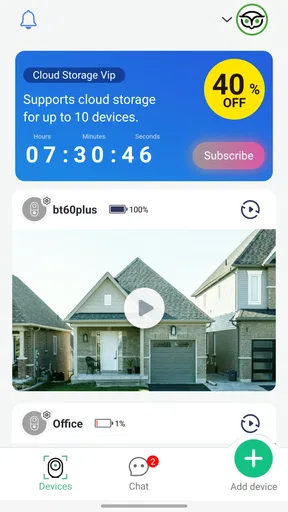
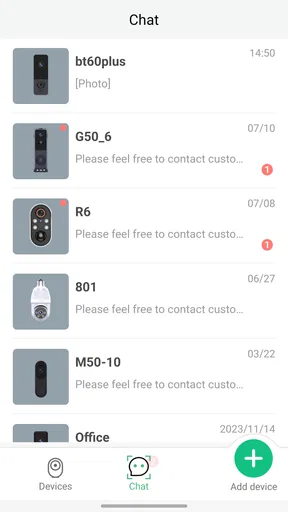
First things first, let's talk about the interface. From the moment I launched the app, I was struck by its sleek and intuitive design. It feels like the developers really put a lot of thought into the user experience. Navigating through the app is a breeze, and everything is laid out in a way that makes sense, even if you're not particularly tech-savvy.
The home screen gives you a quick overview of all the features, and I have to say, I was impressed by how uncluttered it feels. No unnecessary buttons or confusing menus—just straightforward options that are easy to access. It's the kind of design that makes you feel at ease, allowing you to focus on the functionalities rather than getting lost in navigation.
The Main Features
Now, onto the meat of the matter—what does Seeing actually do? The app is designed to enhance your visual experience by using your phone's camera in innovative ways. It offers a range of features that can turn your everyday scenes into something spectacular.
One of my favorite features is the real-time filters. You can apply these while viewing through the camera, and the results are simply stunning. Whether you want to add a touch of nostalgia with a sepia tone or go futuristic with a neon glow, Seeing has got you covered. The filters are versatile and can be adjusted to suit your taste, which is a huge plus in my book.
Augmented Reality Capabilities
The app doesn’t stop at just filters. It also incorporates augmented reality (AR) elements that can overlay information or objects onto the real world. I had a blast trying out the AR feature, which allowed me to add whimsical elements to my surroundings. It's like having a magic wand in your pocket—endless fun and creativity at your fingertips.
Imagine pointing your phone at a street and seeing historical data pop up or visualizing how a piece of furniture might look in your living room. The possibilities are endless, and the app executes it with impressive accuracy. This feature alone makes Seeing stand out from the crowd.
Customization and Settings
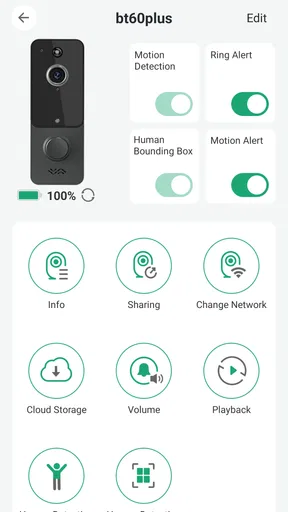
Customization is another area where the app shines. You can tweak settings to tailor the experience to your liking. From adjusting the intensity of filters to changing the layout of the interface, the app gives you control over how you want to use it. I appreciate this level of personalization because it makes the app feel truly mine.
The settings menu is straightforward, and everything is labeled clearly, so you won’t find yourself scratching your head trying to figure out what does what. It's the kind of thoughtful design that makes using Seeing a pleasure rather than a chore.
Performance and Usability
Performance-wise, Seeing is a powerhouse. I didn’t experience any lags or crashes, even when using the more resource-heavy features like AR. The app runs smoothly, which is crucial when you’re trying to capture that perfect moment or explore the world around you.
Battery usage is often a concern with apps that rely heavily on the camera, but I found that Seeing is remarkably efficient. It doesn’t drain your battery like some other apps do, which means you can use it for extended periods without worrying about your phone dying on you.
Final Thoughts
In conclusion, Seeing is more than just an app; it’s a new way of interacting with the world. Whether you’re a photography enthusiast, someone interested in AR, or just looking for a fun and creative way to spice up your day-to-day life, this app delivers on all fronts.
Its combination of powerful features, user-friendly design, and seamless performance makes it a must-try. I can genuinely say that Seeing has become a staple on my phone, and I highly recommend giving it a shot. Who knows, it might just change the way you see the world!
My recommendation before you commit
I would make the decision based on the whole visitor workflow, not just the app screen. Check where the visitor unit would sit, whether you can use it in your home, and whether the people who need to answer are comfortable doing so from their phones. Then test a normal visit and a less convenient one, such as answering from another room. Those checks reveal whether the setup is genuinely helpful or merely interesting in theory.
For someone who wants a direct way to see and speak with visitors on a smartphone, Seeing is worth considering. For someone who needs a guaranteed entry solution, has no say over shared-building equipment, or only wants a doorbell chime, another arrangement may be a better match. I’d approach it as a focused tool rather than a universal replacement for every intercom: useful when its visitor-to-phone path fits your home, less compelling when that path introduces more work than it saves.
Pros
- User-friendly interface enhances accessibility.
- Offers real-time object recognition.
- Supports multiple languages for users worldwide.
- Integrates seamlessly with other apps.
- Regular updates improve functionality.
Cons
- Limited features in the free version.
- Requires constant internet connection.
- Occasional lag in object recognition.
- Battery usage is relatively high.
- In-app ads can be intrusive.
FAQs for Seeing
What is Seeing and what does it offer?
Seeing is an innovative app designed to enhance visual experiences by using augmented reality and AI technology. It allows users to interact with their surroundings in unique ways, providing real-time information and immersive experiences. The app is perfect for educational purposes, navigation, and exploring new environments.
Is Seeing available for both Android and iOS devices?
Yes, Seeing is available for download on both Android and iOS platforms. Users can find the app on Google Play Store for Android devices and the Apple App Store for iOS devices, ensuring a wide range of compatibility across different smartphones and tablets.
How user-friendly is the Seeing app?
Seeing is designed with a user-friendly interface that makes navigation intuitive and straightforward. It features easy-to-access menus and clear instructions, making it suitable for users of all ages and technical abilities. The app also provides helpful tutorials to guide new users through its features.
Does the Seeing app require an internet connection to function?
While some features of Seeing can be accessed offline, an internet connection is required for full functionality, including real-time updates and accessing certain augmented reality features. Users should ensure they have a stable connection to make the most of the app's capabilities.
Are there any in-app purchases or subscriptions in Seeing?
Seeing offers a range of features for free, but it also includes optional in-app purchases and subscription plans. These provide access to premium features, exclusive content, and ad-free experiences. Users can choose to enhance their experience based on their preferences and needs.


